
Pixly
vs Company Cam
Which is the Easier Alternative for Job Site Photos?
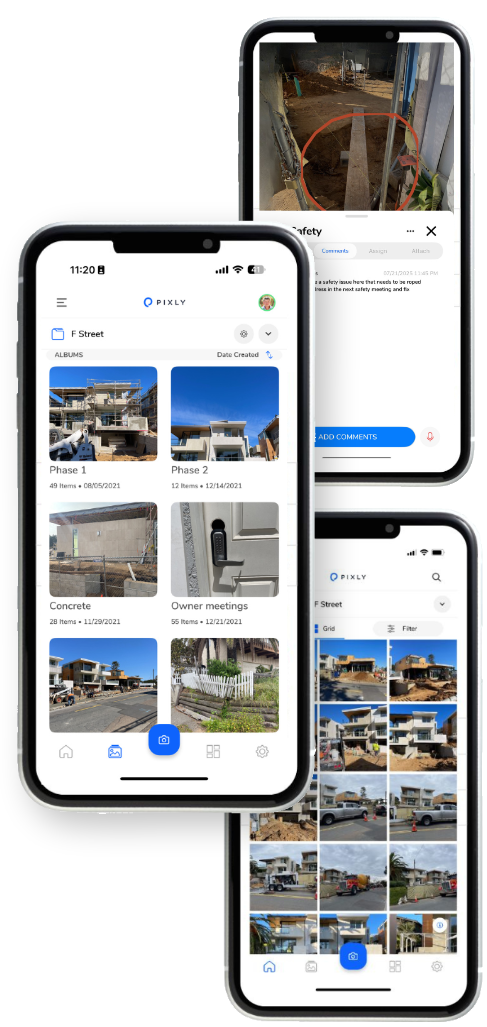
Construction documentation protects revenue, reduces disputes, and keeps projects moving. Photos are often the difference between getting paid quickly and getting stuck in back-and-forth. The platform you use matters, especially when crews are busy and adoption determines success.
Pixly and Company Cam help contractors organize job site photos, centralize communication, and maintain a clear record of work performed. Each platform supports field and office collaboration. The differences show up in workflow design, tagging precision, onboarding speed, and how documentation connects to delegation.
Want a clear comparison focused on how each system supports real construction operations? Keep reading.
Get A Demo of Pixly Today.
What Both Platforms Do Well.
- Cloud-based photo storage
- Automatic timestamps
- Project-based organization
- Team photo uploads
- Searchable archives
- Shareable documentation for clients and stakeholders
- Keeping project photos out of text chains and drives
What Sets Pixly Apart for Photo Documentation?
Ease of Use & Pricing
Most teams can be trained on Pixly in about 30 minutes. That short learning curve matters in construction environments where time is limited and turnover can be high.
Pricing starts at $24.99 per user per month and scales down with larger teams. The structure is straightforward, which makes scaling predictable for growing teams.
Clean Organization Structure
- Worksite
- Project
- Team member
- Date
This structure removes guesswork. Crews know exactly where to upload. Office staff can locate documentation quickly. There are no complicated category trees or feature-heavy dashboards to navigate before getting started.
The result is faster adoption. Teams can begin using the platform immediately without long onboarding sessions.
Pixel-Level Tagging in Images for Clear Directions
Pixly allows users to tag directly on a specific pixel within a photo. That tag can include:
-
Comments
-
Assigned team members
-
Status updates
-
Scheduled tasks
Instead of writing a general note about an issue, a supervisor can tap the exact location in the image where attention is required. The task stays tied to that precise point.
This supports change requests, punch items, scope clarification, safety concerns, and quality control. Field teams and project managers see exactly what needs correction without additional explanation
Real-Time Delegation Inside the Photo
Because tags support assignments and comments, the photo becomes part of the task workflow. Crews can:
-
Assign corrective work immediately
-
Clarify expectations
-
Track issue resolution
-
Maintain a record of communication
This keeps documentation and action connected in one place. It reduces the need for separate task systems when resolving jobsite issues.
Geo-Location for Verification and Context
Pixly captures geo-location data with each photo and allows project maps to display every documented project location and issue location with precise location data. This adds another layer of documentation value:
Confirms the photo was taken at the jobsite
Adds spatial context on larger properties
Helps manage multi-building or campus-style projects
Strengthens dispute protection with verifiable location data
For contractors working across multiple sites, GPS metadata makes retrieval and verification straightforward.
End-of-Day Reports Without Extra Work
Pixly integrates with common construction tools, including:
-
Project management platforms
-
Estimating systems
-
CRM platforms
-
Scheduling tools
-
Cloud storage solutions such as Google Drive and OneDrive
These integrations allow documentation to connect with systems already used by office staff. Field crews benefit from a simple interface while office teams maintain operational continuity.
Integrations That Fit Existing Workflows
Supervisors often spend significant time compiling daily reports. Pixly streamlines this process. Documentation captured throughout the day can be organized into instant reports for project managers or stakeholders.
Because photos are already structured by project, date, and team member, report creation does not require sorting or manual file transfers. Many teams recover hours each week by eliminating the end-of-day scramble.

What About Company Cam?
Photo Management Structure
Company Cam offers reliable project-based photo organization with searchable timelines. Teams can track project history and access visual progress easily.
Before-and-after comparisons and organized galleries are useful for both internal review and client communication.
Integration Ecosystem
Company Cam integrates with a wide range of CRM, estimating, and project management systems. Companies already operating within those ecosystems may benefit from that connectivity.
Client-Facing Sharing Tools
Company Cam includes annotation tools, reporting features, billing and invoicing and team activity tracking. For organizations that don’t have another client billing app that functionality may be nice.
Tags Used To Categorize Images
Rather than using in picture tagging that applies notes to the specific area of the image, Company Cam uses tags as a way to categorize images. This is also done in Pixly however the naming convention is different.
AI Walkthroughs
The premium version of Company Cam offers AI walktrhoughs of jobsites which is beneficial for very large projects.
Reports Of Difficulties With Crew Use
At Pixly we have had many customers come to us in demos and report the reason that they were looking for a new solution. They say that their teams have a hard time figuring out the app and don’t use it. That training them took more effort then they hoped for.
We don’t have direct experience with training teams with the software, but they reported that the solution didn’t end up getting used in the field for those reasons.
Upgrades Can Become Expensive
Company Cam is competitively priced for the most basic version, however as additional features like Lidar scanning, Ai tools or document signing are added, the cost increases significantly. Also note that larger crew sizes will be charged at $29 per additional user at the time of this article being published.
The Verdict...
Both Pixly and Company Cam improve jobsite documentation and reduce reliance on text messages and unorganized photo storage.
If you’re looking for additional features like AI summary tools, Lidar functionality and billing tools, Company Cam offer these features that Pixly doesn’t currently have.
If you’re looking for an easier to use and more affordable app Pixly offers those things as well as some additional features & benefits. In image tagging down to the pixel for improved task delegation, improved organization, and some of the premium features you find in Company Cam are standard with Pixly. We designed the app to ensure that teams can get started immediately and that it gets put to use everyday.
If you’re interested in a Company Cam alternative, book a demo today and see what Pixly can do for you.
A Project Photo Can Be Worth A Thousand Words.
Or Millions Of Dollars.
Watch a demo & see how Pixly can work for you.
Trusted By Leading Builders








Getting Started With Pixly
Pixly makes it easier then any other photo documentation solution to get set up, and start saving massive amounts of time, while nailing your project documentation.
Start a Free Trial, or Book a Demo To learn more.